The
HJW Electronics Choccy Block Transistor Radio Kit
This
is currently still available for sale in limited quantity.
There is a version that uses the same electronic circuit that
is quicker to build. I highly recommend the Breadboard Six Transistor Radio Kit.
It is also somewhat cheaper.
Paper documentation is not provided.
This is a MW AM
transistor radio which can be constructed without soldering
using 3A terminal strip. It is a modern response to the 1971
Ladybird Book Radio and works as well as some AM radios that you
could buy in a shop. It's best to read right through the
construction notes first before starting out. Why is it called a
Choccy Block Radio Kit? Choccy-Block is the nickname for the
terminal strips on which it is constructed, and they look rather
like chocolate bars.
I supply a kit of all the electronic parts, wire, terminal
blocks, knobs, mounting screws and a cardboard enclosure for
this design with wires soldered on to some parts where
necessary. I've assumed that you have a small screwdriver
for the terminal screws, a fine point marker pen, some small
wire cutters for trimming the component leads and some means of
stripping the insulation from the wire. A craft knife is
good for that. You will also need some paper, glue,
scissors and sticky tape. It is best to mount up the radio
in an enclosure when it is all working. The cardboard
container supplied is pretty good to start with, or you might
choose to use some other method.
What do you need to know before
you start?
The components list has links to photographs that should allow
you to make sense of the different values and to identify which
leg is which. You need to know about resistor colour codes
and you can find that information in many places. It
should be possible to build the radio just by looking at the
pictures, but later on I've included full electronic
explanations. If those don't make any sense, don't let
them put you off just building the circuit.
The schematic diagram can look a bit daunting to the
novice. Don't Panic. You don't need to understand it
all to make it work. The idea of this design is that if
you follow the plan it should work without too much
fiddling. Experienced builders will find the schematic
diagram helpful as well.
How To Build It: Follow The
Pictures and Schematic Diagram
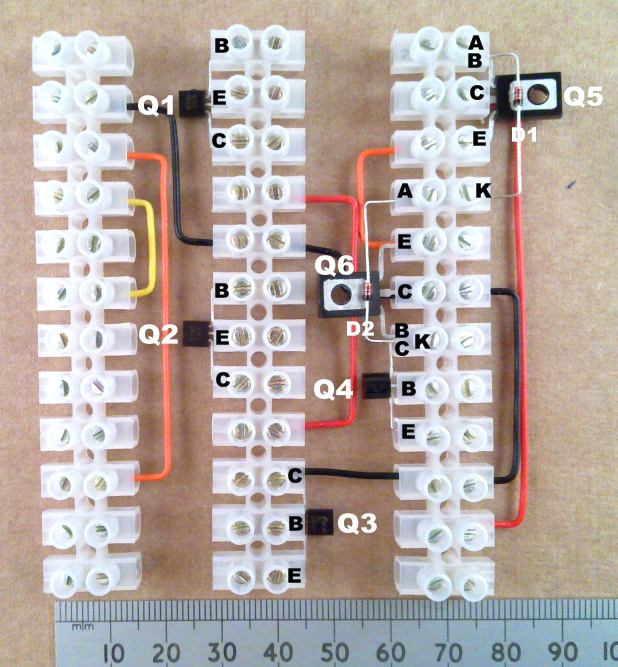
Assemble the Wire Links
Start by cutting to length, stripping the ends and assembling
the single core link wires into the terminal strips as
shown. Each wire must have the end stripped of insulation
by about 6mm so that the terminal strip screw touches the bare
wire. It is best if each wire end is only trapped under
one screw on the side which it enters the strip. For now,
tighten the screws only very gently, just enough to hold the
wires in while you put everything else together. As long
as they are in the correct holes, the wires don’t have to be
absolutely in the exact shapes shown, but it will make it easier
to check everything later on if it’s made just like in the
picture. You can click on the pictures to see a bigger
version.
Assemble The Transistors and
Diodes
Identify the various different transistors and bend their legs
as shown in the BOM pictures so that they will fit into the
strips. The transistor legs will only bend a few times
before dropping off, so it’s best to get it right first
time. Assemble the two diodes in the positions shown, so
that the glass bodies are in contact with the transistors but so
that the wires are not touching the metal part. The diodes
and transistors have to be connected the correct way round as
shown by the identification letters next to the legs. Note
that Q4 is connected with the curved side facing upwards and the
flat side facing down. Q5 and Q6 may be supplied as fully
insulated parts without any metal showing to help avoid
shorts. Where this is the case, the side with the
lettering on always defines the upper side. They should be
fitted with the lettering facing down.
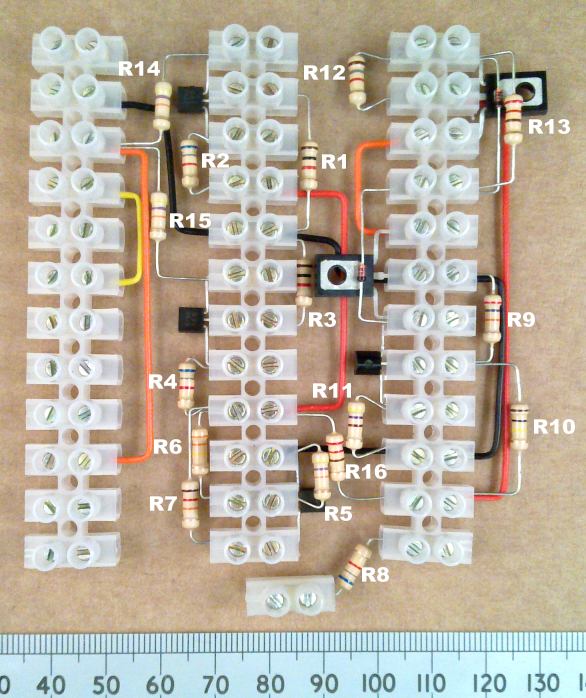
Assemble The Resistors
You can fit the resistors either way round, but it will be
easier to check later if the gold coloured bands are pointing
down or to the right. R8 requires an extra loose terminal
block to connect it to VR1.
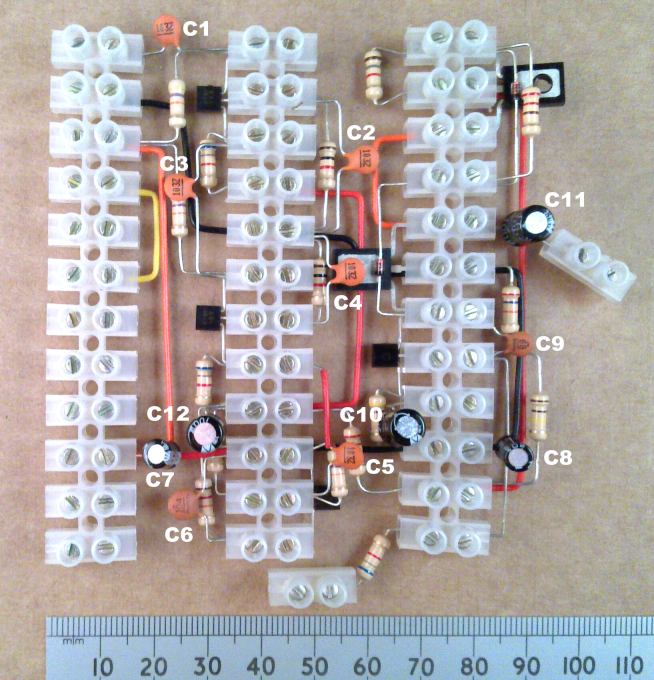
Assemble The Capacitors
In the next stage, fit both the ceramic disc and electrolytic
capacitors. With the exception of the bipolar one, the
electrolytic capacitors have to be connected the correct way
round. Now that things are getting a bit crowded, you
might find that keeping the capacitor wires from touching wires
that go into other holes is quite difficult. Where this
happens, take some discarded wire stripping and slide it onto
the capacitor wires to avoid short-circuits. I needed to
do this on C7 and C5, and sleeving the wires of C8 may be a good
idea too. If the stripped sleeving doesn’t fit on very
easily, try putting a small amount of vegetable oil on the wire
first. C11 requires an extra terminal block to connect it
to the loudspeaker.
The second picture shows an example of covering one of the leads
of C5 where it crosses one end of R16.
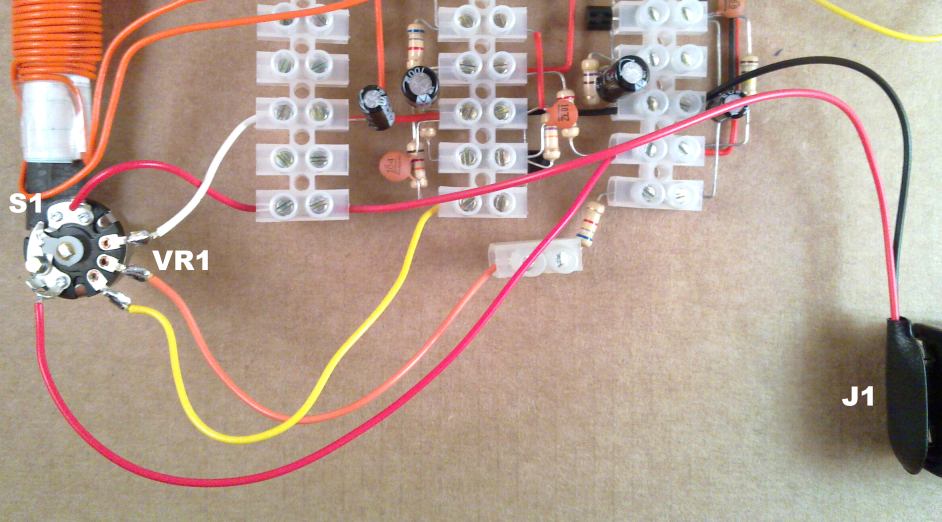
Connect up VR1, the Battery
Clip, the Loudspeaker and VC1
VR1 comes with wires attached for both the volume control and
on-off function. They are longer than needed for the
standard construction in case you want to use a different
box. The pictures show them fitted and cut to the right
length for the cardboard enclosure. Do the same with the
battery clips and the loudspeaker. The connection strips
of tuning control VC1 can be bent and connected in so that the
shaft points downwards below the level of the terminal strip
bottom face. At the end of construction, this will
protrude out of the front control panel.
The final picture shows the main circuit from underneath, with
the shaft of VC1 pointing upwards.
Wind and Connect the Antenna
Coils
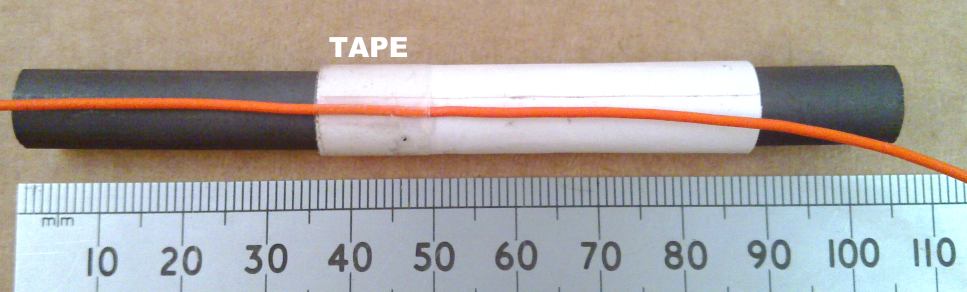
The input coupling coil is the small one which takes the signal
from the ferrite rod and feeds it into the radio. This is
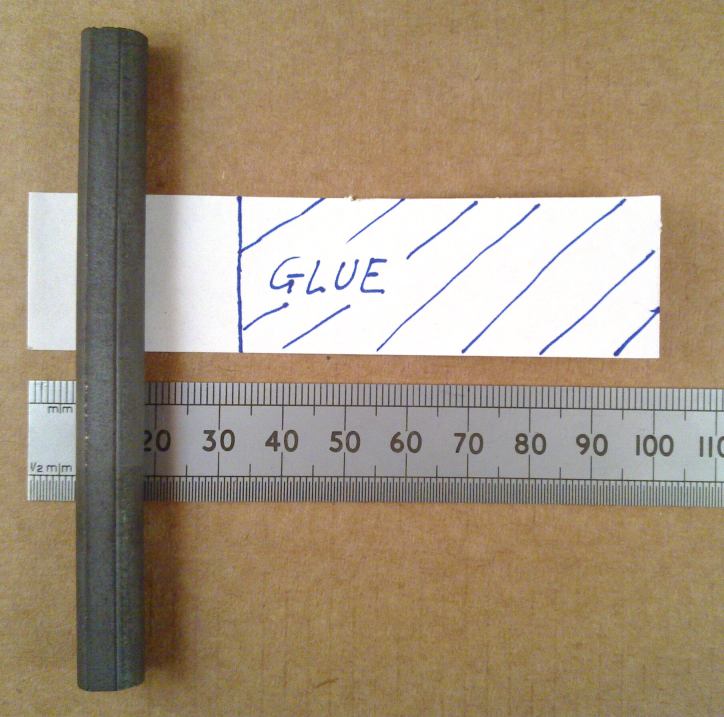
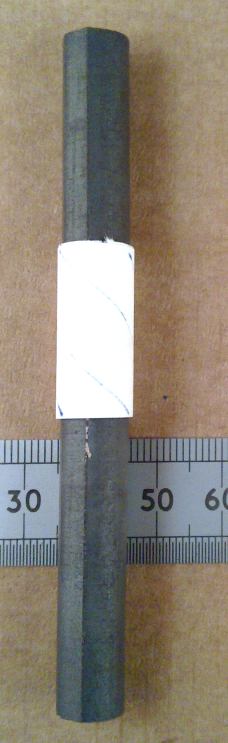
constructed as follows. First make a paper tube about
2.5cm long. Use a strip of some normal printer or magazine
paper about 2.5cm X 10cm. Put stick glue on about 8 of the
10cm length then wrap this around the ferrite rod so that the
glue sticks the paper and forms the tube.
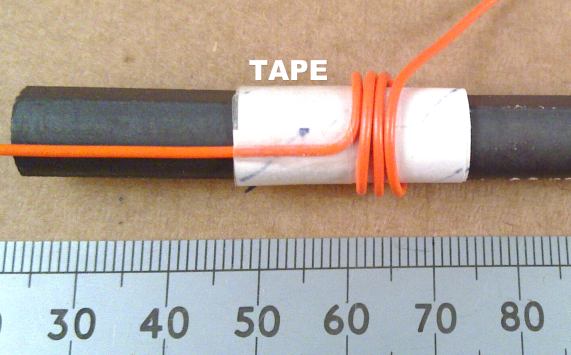
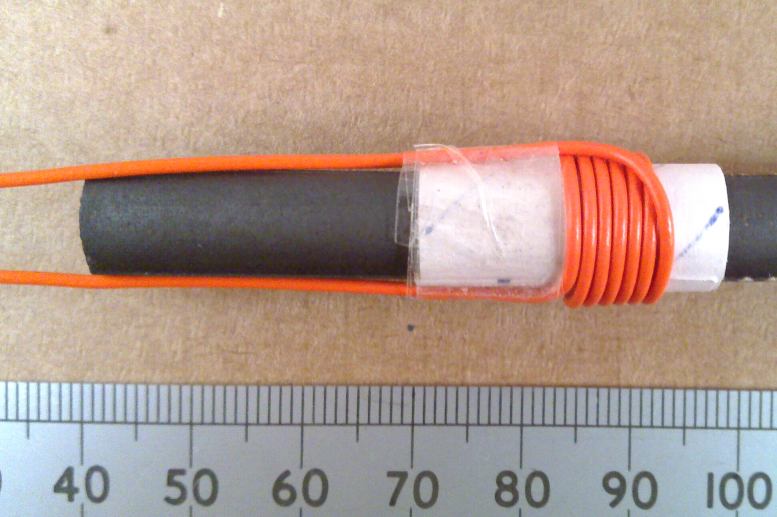
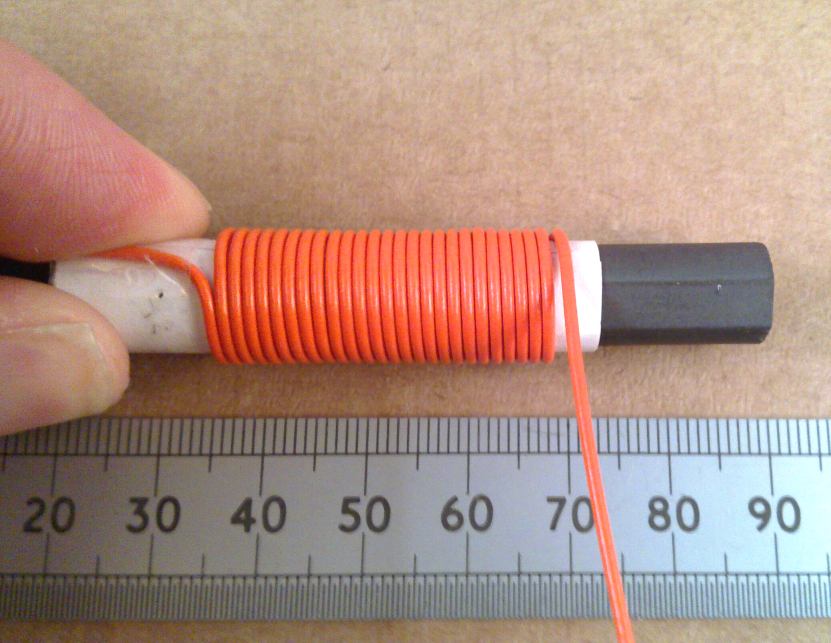
After this has dried, using single core PVC insulated copper
wire, wrap 6 turns onto the tube. Secure the start end
with sticky tape first and then the far end when it is
complete. You can follow the photographs which show this
process. Don't wrap the paper, the wire or the tape too
tightly or you won't be able to slide the coil up and down the
rod. I recommend
winding the wire by rotating the rod and former rather than
wrapping the wire around. Wrapping it around tends to put
a twist in the length of the wire which makes it tangle up more
easily.
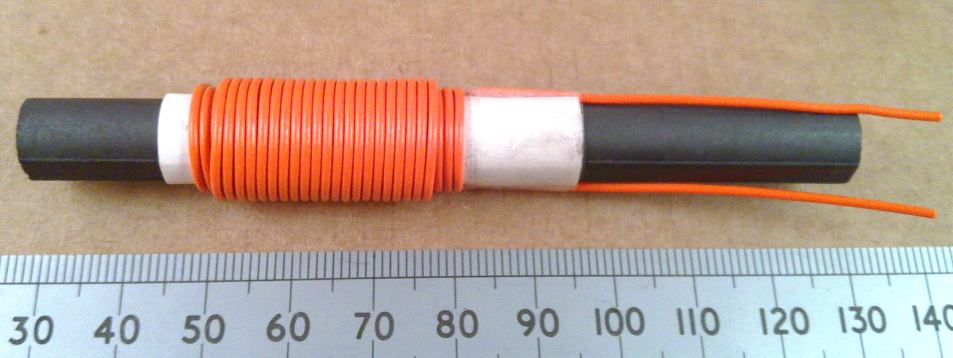
The main MW tuning coil is the large one which is connected to
the tuning capacitor.The paper tube for this is made from paper 6cm X
10cm. First wind the coil in one direction across the tube
for about 25 turns and then 20 turns over the original turns
coming back in the other direction. When this is done, connect
the large coil to the tuning capacitor connections and the
coupling coil into the radio input.
That’s It, but Check and
Secure
If you've gone stage-by-stage and everything is in the right
place, it should be ready to go. It's worth double
checking the direction of the two diodes, the transistors and
the electrolytic capacitors. Then go down both sides of
each terminal strip checking that they are tightened up enough
to hold the wires in but still not over-tightened at this
stage. None of the wires should be loose enough to pull
out without forcing it. Check that there are no shorts
between wires going into different holes.
C13 Retrofit Capacitor
When I first designed this and had taken all the photographs, I
had made a mistake. I'd forgotten to put a supply rail
decoupling capacitor across the main 9V battery rail, but it
made no difference when I added one so I went ahead and
published anyway. This is completely fine with alkaline
batteries, but when using the older cheap zinc-carbon types you
need C13, a 100uF electrolytic capacitor connected as shown in
the picture below to act as a reservoir to stabilise the battery
voltage. This should always be fitted.
Starting Up and Initial Testing
Connect the
battery and rotate the volume control up to about halfway.
Turning the tuning control should immediately allow you to hear
the main MW stations. Finishing Off
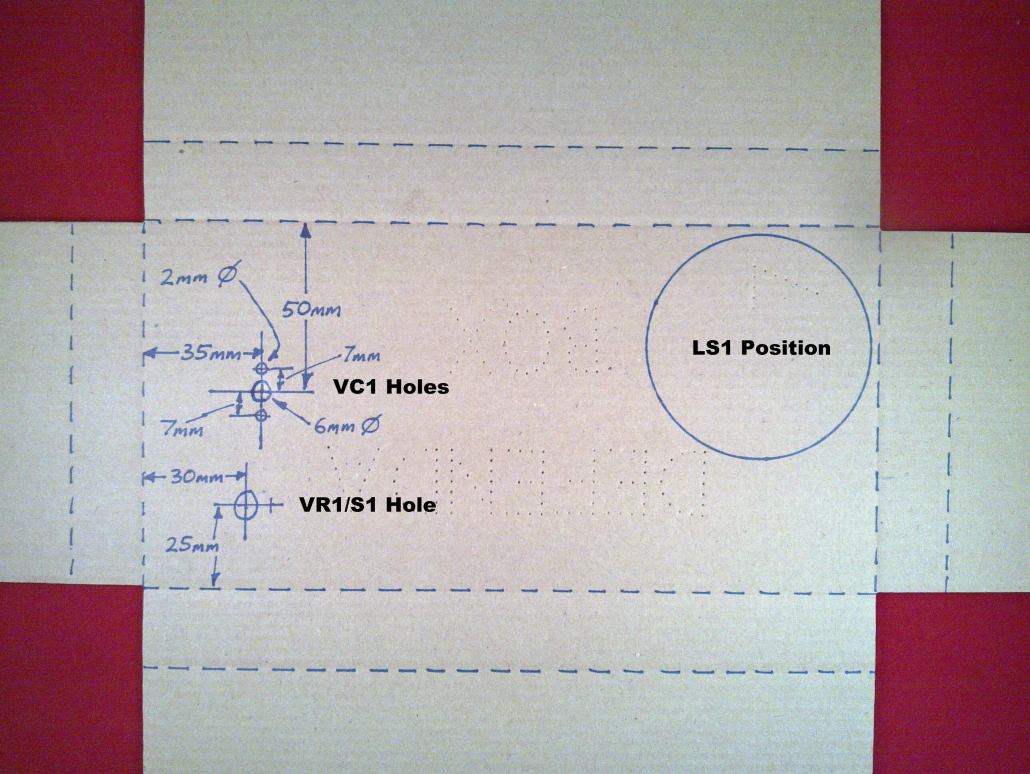
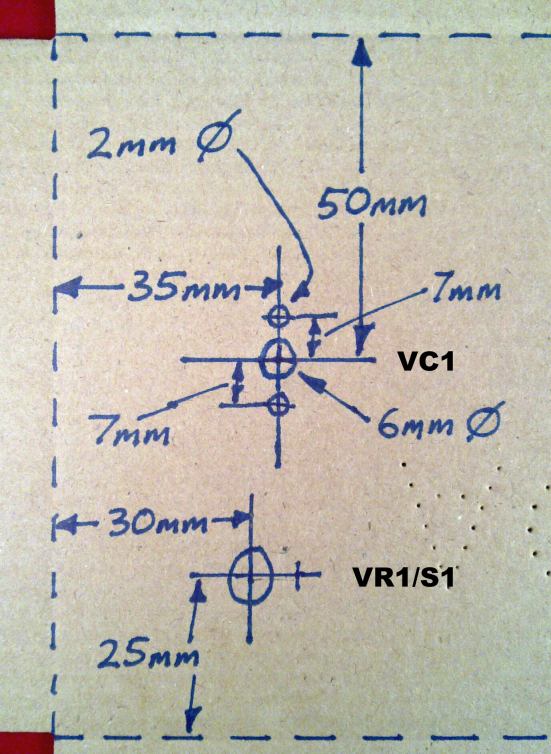
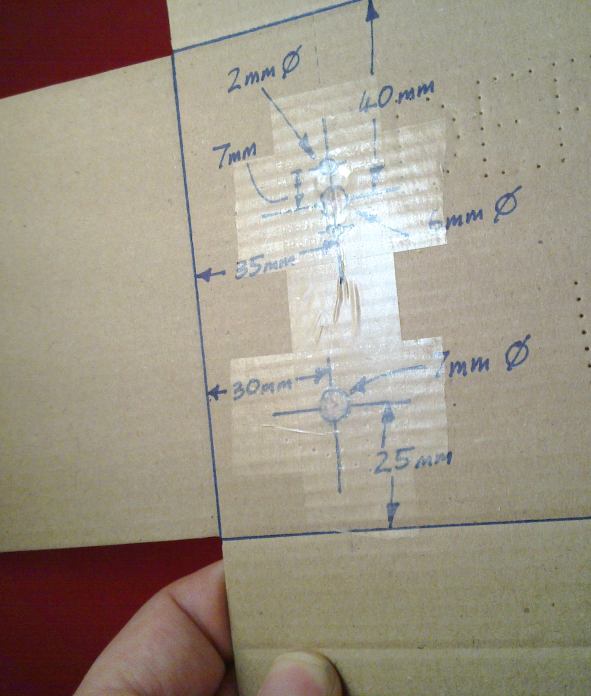
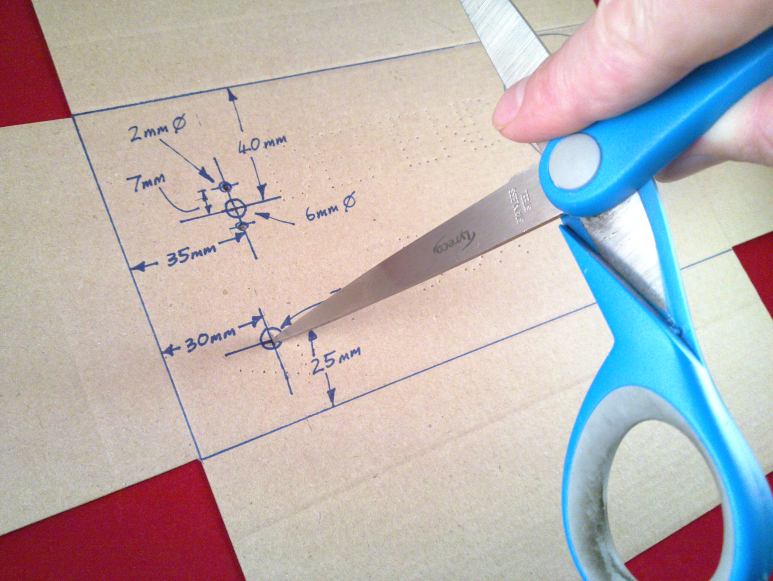
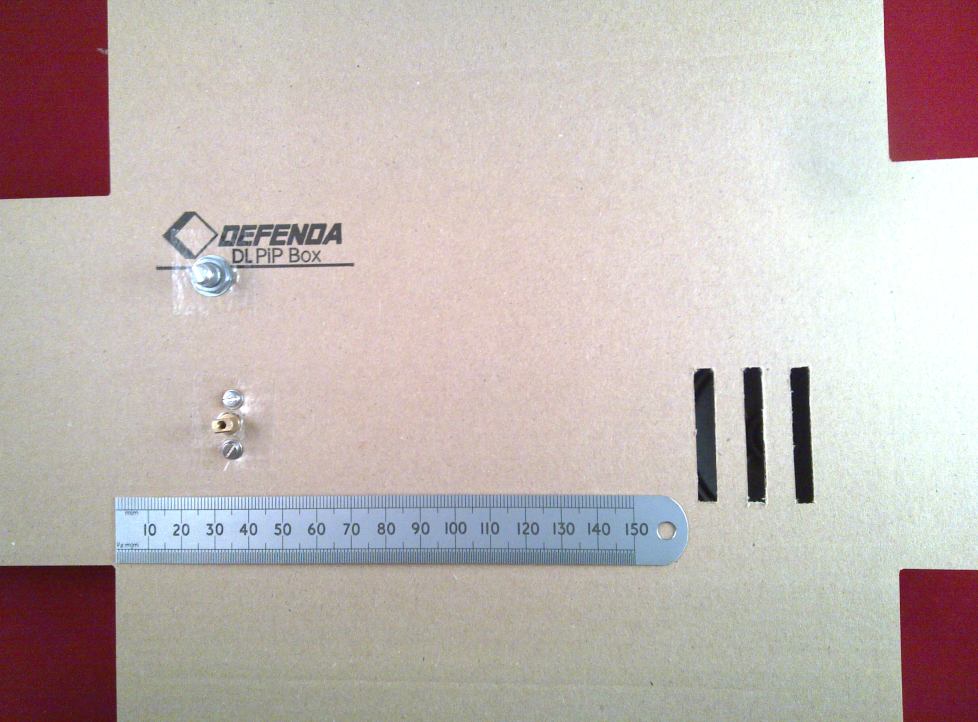
The following pictures show how to put the radio into the
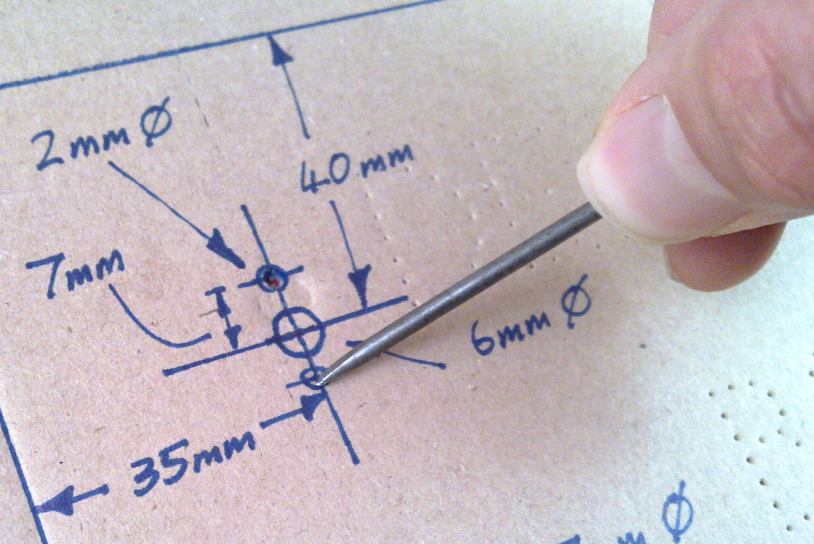
cardboard box supplied. The box should be marked out as
shown and holes made in the appropriate places for the volume
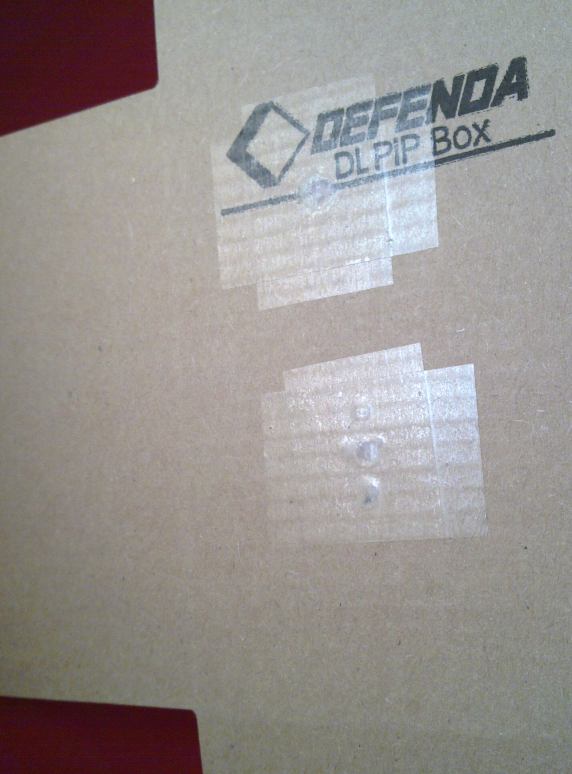
control, tuning control and loudspeaker. Applying tape to
the holes around the volume and tuning controls strengthens the
box and the two controls can be fixed quite securely. It is good
if you can use a pillar drill to make the circular holes neatly,
but as it's cardboard it is possible to do it with a screwdriver
and scissors as shown. The loudspeaker slats can be cut
out with a craft knife or scissors. Craft knives are razor
sharp, so use an appropriate level of care.
When all the holes are ready, the radio circuit can be offered
up to the board so that the shaft of VC1 goes through the
correct hole. It may be easier to put the 4mm bolts and
washers in position first then the position of VC1 can be
adjusted to meet up with them. Tighten up the bolts into
VC1 just enough to squeeze the board a little. The front
face of VC1 and the bottom of the terminal strips should all be
flat against the surface. The knobs can be attached now,
by putting them over the shafts and tightening the grub screw in
the side. The
loudspeaker can be held against the sound holes with sticky tape
or more permanently attached with sparing use of PVA glue around
the edge. The
battery can also be taped down, or when the box is closed it
will hold in quite steady if it is just wrapped in some paper.
When everything is fitting well, providing everything is still
working you can give each of the terminal screws a final
tightening, fold up the box and put a couple of elastic bands
around it. The side flaps fold over first, then the longer
top and bottom flaps fold down over them to meet in the
middle. If you tape up the box more permanently, the
internal part of the side flap next to the battery can be cut
shorter and left untaped to allow that to be opened for changing
the battery. I stayed with just the elastic bands, so that
it was easier to show the inner workings.
The Completed Radio
Now that it's all together, you can count how many AM stations
you can pick up, bearing in mind that the antenna is directional
so you have to rotate the radio for the best signal. If
you find that you are missing the high frequency end of MW you
can move the main tuning coil closer to the end of the rod,
shuffling up the coupling coil to meet it. How good is it
compared to something bought from the shops? The three
models that I have made up are all of identical performance and
I think that it compares well with a small shop radio. The
tuning was sharp enough to distinguish the three Absolute Radio
frequencies of 1215, 1242 and 1260 kHz in Farnborough, Hampshire
UK (when they were still
transmitting) which is good going for this simpler
design. There's no need for external aerial wires as with
some home constructed designs. The audio amplifier drives
the small loudspeaker to a good volume.
My Radio Isn't Working
Have another look
for shorts between components where they are spanning many
terminals and where they are close to other wires. If
you've got a multimeter, use the 10V voltage measurement range
to check around the d.c. voltages when tuned away from a
station. With a fresh 9V battery you should see voltages
that are very close to those marked on the schematic
diagram. Very close in this instance means within plus or
minus 0.3V of the figure in the diagram. The voltages
marked on the schematic diagram are measured values for direct
connection of 9.0V power with low signal input, all with the
negative meter lead connected to the negative battery
terminal. If you see a voltage that is more than about
0.3V out either way, then there is probably something wrong in
the circuit around that transistor. If all voltages look
low, the battery rail is probably shorted out in some way.
If you have intermittent operation that comes and goes with
vibration or handling, gently prod the various parts of the
circuit until you find the sensitive part. There will
usually be a wire loose or shorted in that area.
The area around Q2 and C5 is quite sensitive to interference
from nearby wiring. If you have used a different
enclosure, ensure that the wiring in general and the two coils
on the ferrite rod in particular is kept physically distant from
that area of the circuit.
If you find that the radio is working but is very hissy or
squeals, try moving the coupling coil up the ferrite rod a small
distance away from the main coil.
End Of Construction
That's the end of
the construction notes, and is as far as you have to read if you
just want to build the radio. What follows is some more
in-depth technical description and design philosophy discussion
for the electronics engineers. After that there is a FAQ
which may be useful if you're still having problems getting
going, or if you've bought all your own components. If you
fancy trying some further modifications, there's a page with
some ideas on too.
Design Philosophy
As noted at the top, this is intended to be a modern replacement
for the 1971 Ladybird Book "Learnabout: How to Make a Transistor
Radio" radio. I've described elsewhere how I didn't have
much success with this as a kid, mostly due to the problems with
1960s transistors and their substitutes in a simple
design. I have made up kits of parts for the 1971
G.C.Dobbs design but I didn't want to encourage the use of
germanium transistors and LT700 output transformers. I
propose this design as an alternative. It is more complex
and has twice as many transistors, yes; But with the
additional complexity it works better, it is more consistent,
you can get all the parts, and it is cheaper.
Why do we need another design for a simple AM radio when there
are already so many?
Although there are many designs around, none of them seemed to
bring together all of the points below.
Uses entirely cheap modern components.
Is very insensitive to any component variation.
Has no integrated circuit black box components.
Can be built with a solderless assembly scheme.
The solderless assembly scheme is reliable and doesn't have to
be taken apart afterwards.
Has no fiddly adjustments.
Uses design principles which can be fully explained.
Uses no funny electronic tricks.
Works as near as possible to something that you might buy from a
shop.
Terminal Strip Construction
I've started from the assumption that soldering puts many people
off electronic projects. A good soldering iron isn't
cheap, burns the inexperienced quite readily and will set fire
to the house if it doesn't have a proper stand and falls off the
desk if left switched on unattended. It requires a small
amount of skill too. It's possible to make transistor
projects on plug-in breadboards, and then you can have ICs as
well. That's true. You will also generally find that
the parts fall out, the connections are terrible and you are
told to take your circuit apart at the end of the lesson so that
the breadboard can be used next time. What's the point in
that? Terminal strip isn't perfect. The components have to
be quite large, you have to get the wires under the screws, look
out for shorts, and when you finally give it a decent firm screw
down at the end, the component leads are not usually re-usable
afterwards. But you do get to take your project home and
it can be made reasonably reliable in operation.
Choccy Block Radio Detailed Circuit Description Choccy
Block Radio FAQ
Should
you have any problems or
questions, my main email
address is shown below.
This address has been the same
since 1997 and unless I'm on
holiday beyond mobile
coverage, it is checked daily
including the spam folder: